
In a previous post (Yes You Can Create WISER Alerts Using Microsoft’s Power Automate), I showed how you can automate a workflow based on WISER-generated data by regularly querying WISER’s API to read the system state and conditionally trigger some action. The WISER Tracker server also has its own automation engine; “Rules” can automatically generate those triggers for you. These automatic triggers are particularly useful for “real-time” events, such as a tag entering a geofence or two tags coming into proximity with each other. These events would be less practical to implement by constantly checking on an interval because you could miss the event. In this post, I will show how to leverage WISER Rules to mark a tag that has entered a particular geofence or zone with a group or label.
Creating Rules
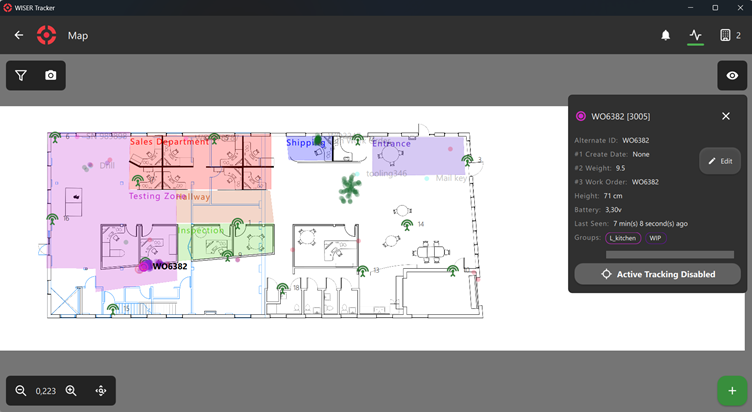
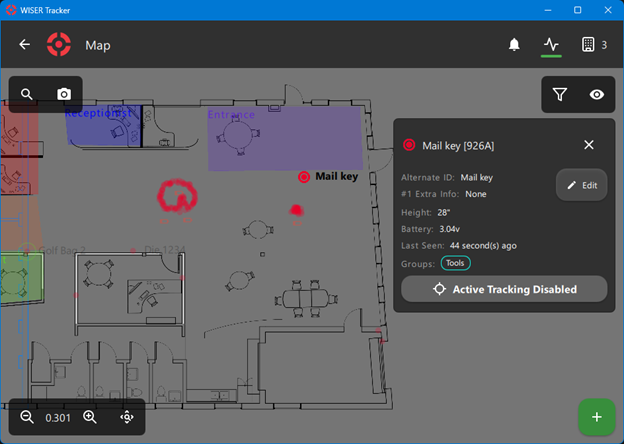
First, we will need to set up those groups and zones on the map. I want tags that enter the “Entrance” zone (in purple to be assigned to the “Status Shipping” group. Except the mail key, which is already in the “Tools” group; we really should not ship that.
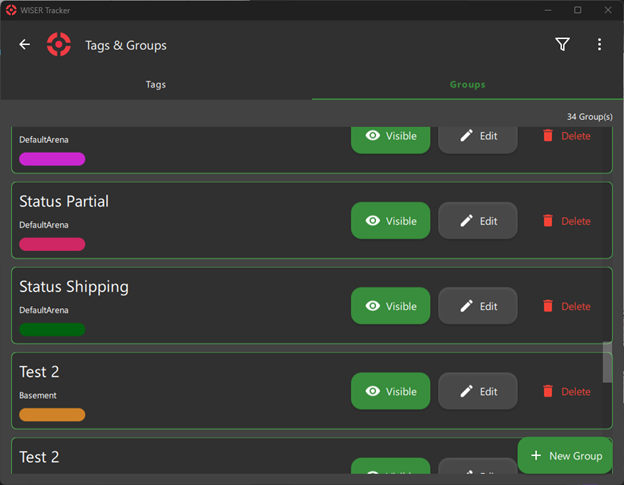
We can manage groups under the Tags & Groups menu, Groups tab.
Next, we will set up our rule for the trigger. The rule type is “Zone Dwell Time.” This will trigger when the tag(s) or tags in groups we specify are inside a zone for a certain period, although that “Notify Time” period may be 0 to trigger instantly. This is pretty powerful and will catch any tag that just passes through. Maybe we want to receive an alert only if a tag has been sitting in Shipping for a couple days? Or a couple hours? For our rule, we’ll give it a name like “EnteredEntranceZone,” pick the zone “Entrance,” and ignore the Hysteresis and Detection Repetition for now. I will choose to let the rule apply to all our tags, because the automation will check the tag groups manually later, but if you knew this rule should only be applied to tags in the “Status Complete” group, that could be selected here.
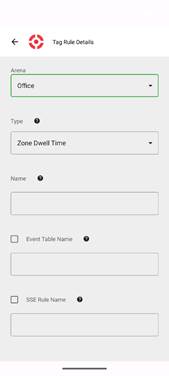
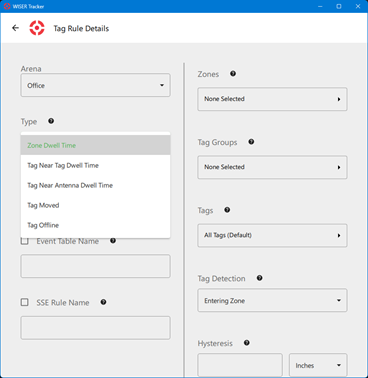
Then we have to make a choice. These triggers can be pushed to another system in two ways (for now), either by writing the event to an external database or by Server-sent events (SSE), or both. If using SSE notifications, when creating the rule, we need to give it a name, although it can be the same as the rule name. Note SSE will require user authentication, because it has to know to whom to send the notification. If writing to the external database, we give the event table a (database-compatible) name. For the database option, there are two more options for the table; “Maximum entries” and “Flush events older than” let us limit the number of events so the history doesn’t grow endlessly. If we’re checking the database every 30 min, we could pick 300 minutes, and we don’t expect to see more than 100 tags entering in that period, maybe we pick 1000 entries. Now, every time a tag enters the Entrance zone, this rule will fire off an event.
Setting up the Automation
Now we need to read these events with an external integration to perform some automation action. Here I will use Python for code snippets, but almost any programming language or ERP automation should be able to do similar. Let’s start with SSE. First we check our active subscriptions, to make sure we don’t re-subscribe, then subscribe. We make a HTTP GET request to the API.
API_BASE_URL = 'http://localhost:3101/wiser/api'
auth=HTTPDigestAuth(USER, PASS)

resp = requests.get(f"{API_BASE_URL}/sse", auth=auth, headers={'Accept': '*/*'})

subscribed_events = {sub.get('typeExtension') for sub in resp.json() if sub.get('type') == 'notification'}
Which, if we’re already subscribed, would return a JSON message like:
[
  {
    "id": 0,
    "type": "notification",
    "typeExtension": "EnteredEntranceZone"
  }
]
Or if not, then we can subscribe (this is still a GET):
resp = requests.get(
  f"{API_BASE_URL}/sse/notification/EnteredEntranceZone",
  auth=auth,
  headers={'Accept': '*/*'})
resp.status_code != 200:
  print('SSE subscription failed.')
Then we listen for incoming events. Simplified, that looks like:
SSE_URL = 'http://localhost:3105/wiser/sse'

while true:
  try:
    messages = SSEClient(
      f"{SSE_URL}",
      headers={'Accept': 'text/event-stream', 'Cache-Control': 'no-cache'},
      auth=auth))
And incoming notifications will look like:
[
  {
    "count":1,
    "data":
    {
      "ruleName":"EnteredEntranceZone",
      "sseEventName":"EnteredEntranceZone",
      "tagId":51638,
      "time":1763494984487375600,
      "type":"ZoneDwellTime",
      "zoneId":"Entrance"
    },
    "subscriptionId":0,
    "type":"tagrule"
  }
]
What about reading from the database instead? We can check the database’s EnteredEntranceZone event table for any events that occurred since we last checked. Be careful, the order-of-operations here can get hairy if there are multiple rules active. Maybe we need to check all tables and their recent timestamps. This is one reason why the real-time nature of SSE is preferred. For SQLite, that read might look like:
conn = sqlite3.connect(DB_PATH)
  try:
    conn.row_factory = sqlite3.Row
    cur = conn.cursor()
    event_rows = {}
    try:
    cur.execute(
      f"""
      SELECT e.shortid, e.timestamp
      FROM {DB_EVENT_TABLE} e
      JOIN (
        SELECT shortid, MAX(timestamp) AS ts
        FROM {DB_EVENT_TABLE}
        GROUP BY shortid
      ) m ON e.shortid = m.shortid AND e.timestamp = m.ts
      """
    )
    for row in cur.fetchall():
      event_rows[int(row['shortid'])] = {
      'timestamp': int(row['timestamp'])
      }
Having received the event, identifying which tag entered the zone, we can now assign that tag to a group. We can first read the list of existing groups with a GET to the /taggroups endpoint. In the case that the tag is already in other groups, we need to first read the tag’s list of groups, to check if it’s a group that we shouldn’t ship, or at least a group we shouldn’t overwrite, using a GET to the /tagproperties/id/51638. We can then modify the group list and write back with a PUT to that same endpoint.
The /taggroups endpoint returns:
[
  {
    "color": "#cf273b",
    "id": 0,
    "name": "Status Partial"
  },
  {
    "color": "#cf8227",
    "id": 1,
    "name": "Status Shipping"
  },
  {
    "color": "#12f3e3",
    "id": 2,
    "name": "Tools"
  },
And /tagproperties/id/51638 will return something like:
[
  {
    "groups": [
      0
    ],
    "groupsbyname": [
      "Status Partial"
    ],
    "tag": 51638,
    }
]
If needed, we PUT back with a request body of {"groups":[1]} to assign that tag to the “Status Shipping” group.
And that’s it! As long as this Python (or whatever automation tool you’re using) is running, it will automatically update groups of tags entering this zone. We could even set up another WISER Rule that applies to the newly assigned group. Go nuts! We think it’s very fun to set up these automations.
If you are interested in talking with someone from WISER about how we can help at your facility, please feel free to reach out. You can contact us via our website, email, or phone.